⚠️ Affiliate Disclosure: CoinCodeCap may earn a commission when you sign up through links on this page. This doesn’t change our editorial views. Prediction market trading carries real financial risk and may not be legal in your jurisdiction.
📋 How We Review: We evaluated Kreo on copy-trading depth, AI wallet-matching quality, security architecture, supported markets, ease of onboarding, and how it compares to native Polymarket and Kalshi interfaces. Feature claims verified against the official Kreo documentation.
Prediction markets had a breakout 2024 and 2025. Polymarket processed billions in volume during the US election cycle, Kalshi expanded into a wider catalogue of CFTC-regulated event contracts, and a real ecosystem of tooling sprung up around both. Kreo is one of the more interesting tools in that ecosystem — a Telegram bot and web app built specifically for traders who want to copy proven wallets, automate entries and exits, and find profitable wallets to follow without manually scrolling through Polygonscan. If you’ve already explored crypto trading bots for spot or futures markets, Kreo is the same idea applied to event-outcome contracts.
⚡ TL;DR — Kreo
- 🤖 What it is: Telegram bot + web app for trading on Polymarket and Kalshi prediction markets, with copy trading and an AI wallet matcher built in
- 🎯 Best feature: AI Match — surveys recent wallet performance and recommends profitable wallets to copy based on your risk tolerance and time horizon
- 💰 Minimum trade: $1 per copied trade
- 🔐 Security: Privy (backed by Stripe) for wallet storage + Gnosis Safe smart wallets — keys held in air-tight enclaves, not on Kreo servers
- 🌐 Markets covered: Polymarket (Polygon, USDC) and Kalshi (CFTC-regulated US event contracts)
- ⚠️ Watch-out: Prediction markets are not available in every jurisdiction. Polymarket is geo-blocked in the US; Kalshi is US-only. Check local rules first.
What Is Kreo?
Kreo is a non-custodial trading layer that sits on top of Polymarket and Kalshi. You interact with it through a Telegram bot (@KreoPolyBot) or the web app at enter.kreo.app. Once you start a session, Kreo provisions a smart wallet for you, lets you fund it with USDC (on Polygon for Polymarket, or via Kalshi’s onboarding for US users), and gives you four major capabilities the native interfaces don’t offer out of the box: automated copy trading, AI-driven wallet discovery, configurable take-profit and stop-loss orders on every trade, and a unified watchlist that tracks specific wallets plus an X (Twitter) feed for relevant news.

The product framing is honest about what it’s competing with. Polymarket and Kalshi already have decent web interfaces. What they don’t have is “follow this wallet automatically” or “find me wallets that have made money this month and let me copy them.” That’s the gap Kreo is filling, and it’s the same dynamic that drove the rise of DeFi copy trading apps and Solana-focused trading bots over the past two years.

Key Features
1. Copy Trading — the core feature
This is what most users come to Kreo for. You paste a wallet address, set how you want to size your copies, add filters, and the bot mirrors that wallet’s trades on your behalf. The sizing options are more flexible than most copy-trading bots offer:
- Fixed buy amount — every copied trade is the same size, regardless of what the leader did
- Exact buy amount — you mirror the leader’s dollar size one-to-one
- Percentage-based — buy a set percentage of whatever the leader spent
- Portfolio-weighted — if the leader put 10% of their bankroll into a position, you put 10% of yours into the same position (with an optional ratio multiplier)
On top of sizing, Kreo offers a deep set of behavior toggles: follow buys only, copy sells, “buy on sells” (treat the leader exiting as a signal to enter), counter-trade (invert their direction), one-entry-per-market, price-match mode (every copy treated as a limit order at or below the leader’s fill), category filters (skip Sports, only follow Politics, etc.), per-market spend caps, daily caps, slippage controls, and built-in stop-loss and take-profit on a per-execution basis. Most retail copy-trading tools give you maybe two of these. Kreo gives you all of them.
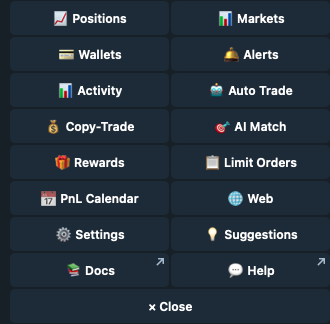
2. AI Match — find wallets worth copying
The harder problem with copy trading isn’t the mechanics — it’s finding wallets actually worth copying. Kreo’s AI Match feature is built specifically for that. You answer a short questionnaire about your risk tolerance, what categories you care about, your trading horizon (intraday vs. multi-week), how active you want the leader to be, and how you want to weight priorities like recent profitability vs. consistency. Kreo then surfaces a ranked list of wallets that match. The wallet pool refreshes hourly, which is genuinely useful in markets where a wallet that printed last week may have already given the gains back this week.
The output isn’t a black box. Each match comes with the wallet’s stats so you can sanity-check before clicking “copy.” This is also where the wallet tracker comes in — type /tracker, paste a wallet, see its trade history and performance metrics before committing.
3. Auto Trade, Limit Orders, and Price Alerts
Beyond copy trading, Kreo gives you the standard automation stack you’d expect from a serious trading bot: limit orders that sit on-book until your price prints, take-profit and stop-loss on positions you opened manually, and price alerts that ping your Telegram when a market crosses a threshold. The point of all three is the same: you don’t have to babysit your phone. If you’ve ever set up a trading workflow with one of the broader crypto futures platforms and missed it for prediction markets, Kreo closes that gap.
4. X Feed and Wallet Tracker
Two features that look minor but matter a lot in practice. The X (Twitter) Feed surfaces relevant news from accounts the bot tracks for each market category, so you’re not flipping between Telegram and X during fast-moving stories. The Wallet Tracker lets you watch specific wallets without copying them, useful when you want to study a leader’s behavior before committing capital.
Pricing & Fees
Kreo doesn’t publish a fixed subscription tier in the public documentation. Like most Telegram trading bots, the model is fee-on-trade: a small percentage taken from each executed transaction, on top of the underlying Polymarket or Kalshi fees. Worth checking the current fee structure inside the bot itself before sizing up — fees can change, and prediction-market trading bots in this category typically range from 0.5% to 1.5% per trade. The minimum copied trade size is $1, which is unusually low for this kind of product and makes Kreo accessible for testing without committing serious capital.
| Plan | Cost | What’s included |
|---|---|---|
| Standard | Free to start | Full feature access via Telegram bot or web app — copy trading, AI Match, limit orders, alerts, wallet tracker |
| Trade fees | Variable | Small per-trade fee taken at execution. Verify current rate inside the bot or in the Settings menu before sizing up |
| Minimum trade | $1 | Lowest viable copy size — useful for testing a leader before scaling |
| Always confirm current fees in /settings before placing real capital. This guide is editorial, not a quote. | ||
Pros & Cons
- ✅ Best-in-category copy trading depth — sizing modes, filters, and per-execution risk controls beat most competitors
- ✅ AI Match removes the hardest part of copy trading: finding wallets worth following
- ✅ Smart-wallet architecture via Privy + Gnosis Safe — your keys are stored in secure enclaves, not on Kreo servers
- ✅ $1 minimum trade size makes testing low-risk
- ✅ Built for both Polymarket and Kalshi — most competitors pick one
- ✅ Telegram-first interface for traders who already live there, plus a web app for desktop workflows
- ❌ No published pricing tier — fees are fee-on-trade and not transparently posted on the website
- ❌ Prediction markets are jurisdictionally restricted — Polymarket is geo-blocked in the US, Kalshi is US-only, both have their own KYC and onboarding flows
- ❌ AI Match recommendations need user verification — past wallet performance doesn’t predict future performance, and the docs themselves emphasize this
- ❌ Polygon-only for Polymarket means you’ll need USDC on Polygon, which adds a bridging step if you’re starting from a different chain
Security — How Kreo Protects Your Funds
This is the section that should matter most to anyone evaluating a new trading bot, and Kreo’s architecture here is genuinely well-designed. Two pieces:
Privy for wallet management. Privy is a wallet-infrastructure provider backed by Stripe — yes, that Stripe. It uses MPC (multi-party computation) and secure enclaves to keep wallet keys away from the application layer. Kreo never directly touches your private keys; the trading layer talks to the wallet layer, and the wallet layer enforces what’s allowed. If Kreo’s servers are compromised, your funds are not exposed because the keys aren’t there.
Gnosis Safe smart wallets. The actual on-chain wallet is a Gnosis Safe — the most battle-tested smart-wallet contract in DeFi, used by major DAOs and treasuries. This gives you transaction-level guardrails that a regular EOA wallet doesn’t have, plus a clear recovery path if anything goes wrong.
The combination is meaningfully more secure than the average Telegram trading bot, where the bot operator typically holds your private keys directly. That said, it’s still a hot wallet by design — the security model assumes you’re not storing your life savings in it. For larger balances, fund the bot incrementally rather than parking everything inside.
Kreo vs. Native Polymarket / Kalshi
| Feature | Native Polymarket | Native Kalshi | Kreo |
|---|---|---|---|
| Manual trading | Yes | Yes | Yes |
| Copy trading another wallet | No | No | Yes (deep filters) |
| AI wallet discovery | No | No | Yes |
| Take-profit / stop-loss per trade | No | No | Yes |
| Telegram interface | No | No | Yes |
| Custodial model | Self-custody | Custodial (regulated brokerage) | Smart wallet (Privy + Gnosis Safe) |
| Onboarding minimum | Varies (gas + USDC) | Varies (KYC + bank link) | $1 per copied trade |
The honest summary: Kreo doesn’t replace Polymarket or Kalshi — it builds on top of them. If you’re a one-off bettor placing a single trade on a single market, the native interface is fine. If you’re trying to run a more systematic strategy, want to follow specific wallets, or want automation around your entries and exits, Kreo is the layer that makes that possible. People who explored building their own bot via routes like our how to make a crypto trading bot guide will recognize the value here: Kreo gives you the automation without the engineering work.
How to Get Started With Kreo
- Open the bot. Visit @KreoPolyBot on Telegram or enter.kreo.app on web. Type /start.
- Smart wallet provisioned. Kreo creates a Privy-secured smart wallet for you automatically — no seed phrases to manage.
- Fund it. Deposit USDC on Polygon for Polymarket trading, or follow the Kalshi onboarding flow for US event contracts.
- Pick your starting workflow. Either run /match to use AI Match for wallet recommendations, or paste a specific wallet address you want to follow.
- Configure the copy task. Set sizing mode, max-buy cap, daily cap, slippage tolerance, take-profit and stop-loss thresholds. Don’t skip the caps.
- Start small. Test with the $1 minimum on a wallet for a week before scaling. Watch how it actually behaves under real conditions.
- Review the activity log. Kreo logs every copy decision (executed and skipped). Read it daily. Adjust filters based on what you learn.
Who Should Use Kreo (and Who Shouldn’t)
Good fit: traders who already understand prediction markets and want automation; copy-trading enthusiasts looking for a deeper feature set than what’s on offer in spot-crypto bots; small-bankroll testers who want to start at $1 to see if a leader’s edge is real; anyone who wants Polymarket and Kalshi access through a single interface.
Not a great fit: first-time prediction market traders (learn the markets manually first — automation amplifies bad decisions); anyone in a jurisdiction where these markets aren’t legally accessible; traders looking for a “set it and forget it” passive income source. Even with the best AI matcher, copy trading requires active oversight. If a leader’s edge dries up, you’ll lose money until you cut the task.
🎯 Bottom Line
Kreo is the most feature-complete copy-trading tool we’ve seen for prediction markets, and the AI Match feature genuinely solves the “who do I copy?” problem that wrecks most copy-trading attempts. The security model is better than average for this category — Privy-managed keys plus Gnosis Safe smart wallets is a more thoughtful architecture than the typical Telegram bot. The honest caveats are that prediction-market trading is jurisdictionally tricky, fees aren’t published transparently up-front, and copy trading is never truly passive. For traders who already understand Polymarket or Kalshi and want to automate workflows they already do manually, Kreo is worth a serious look. Start with the $1 minimum, prove the workflow on a single wallet for a week, then decide if it earns more capital.
FAQs
Is Kreo safe to use?
Kreo’s security model is among the better ones in this category. Wallets are managed via Privy (a Stripe-backed wallet infrastructure provider) using MPC and secure enclaves, and the on-chain wallet is a Gnosis Safe smart contract. Kreo’s servers never hold your private keys. That’s meaningfully safer than most Telegram trading bots, which custody keys directly. As with any hot wallet, treat it as trading capital, not a savings account.
What’s the minimum I can copy with on Kreo?
The minimum copied trade size is $1. That’s unusually low for this category and makes it practical to test a wallet’s edge for a week without committing serious capital before deciding whether to scale.
Does Kreo support Polymarket and Kalshi?
Yes — both are supported. Polymarket trading happens via USDC on Polygon; Kalshi trading happens via Kalshi’s standard onboarding flow for US-based traders. A browser extension that adds Kreo features directly inside the native Polymarket and Kalshi interfaces was listed as “coming soon” at the time of writing.
How does AI Match find wallets to copy?
You answer a short questionnaire about risk tolerance, market categories you care about, holding horizon, leader activity level, and how to weight priorities like recent profitability vs. consistency. AI Match scores the wallet pool against your inputs and surfaces a ranked list. The pool refreshes hourly. Always sanity-check a recommended wallet’s trade history with /tracker before copying — past performance doesn’t guarantee future results, and the docs themselves are explicit about this.
Are prediction markets legal where I live?
Depends entirely on where you are. Polymarket is geo-blocked in the US (with limited recent exceptions). Kalshi is licensed by the CFTC and is US-only. Many other jurisdictions have their own rules, and these can change. This article is not legal advice — check your local regulations before depositing.
Related Reading
- Best Crypto Trading Bots — broader category guide for spot and futures trading bots
- Best DeFi Apps — including Polygon-native tools that pair well with Polymarket
- Best Crypto Exchanges — for getting USDC onto Polygon if you’re starting from another chain
- How to Make a Crypto Trading Bot — if you’d rather build than buy