Affiliate Disclosure: CoinCodeCap may earn a commission when you click our links and make a purchase. This never influences our editorial opinions. Read our full disclosure →
Editorial Note: This OctoBot Cloud review is based on hands-on testing of the platform, verified pricing data (April 2026), and analysis of third-party user feedback from Trustpilot (4.2/5) and SourceForge (4.4/5). We update this article whenever OctoBot releases major changes. Our team does not accept payment to alter ratings.
OctoBot Cloud is an open-source crypto trading bot that automates DCA, grid, TradingView, and AI-powered strategies across 15+ exchanges — without moving funds off your own exchange account. It’s free to start, transparent (the code is public on GitHub), and one of the few bots with a genuinely useful no-strings free plan in 2026.
⚡ TL;DR — OctoBot Cloud
- Open-source crypto trading bot — version 2.1.1 (March 2026)
- Free plan: no monthly fee, no % cut on gains, no hidden charges
- Plans: Investor (Free) · Investor Plus ($9.99/mo) · Pro ($29.99/mo)
- Supports 15+ exchanges plus Hyperliquid DEX (added 2025)
- Strategies: DCA, Grid, TradingView signals, AI/ChatGPT, crypto basket, arbitrage
- Paper trading + backtesting engine included on all plans
- Mobile apps for iOS and Android (iOS added in 2025)
- Trustpilot: 4.2/5 · SourceForge: 4.4/5
| Category | Score (/10) | Notes |
|---|---|---|
| Ease of Use | 8.5 | Cloud setup is beginner-friendly; self-hosted requires more skill |
| Strategy Variety | 9.0 | DCA, Grid, TradingView, AI agent, crypto basket, triangular arbitrage |
| Pricing & Value | 9.5 | Best free tier in the category — no profit sharing on any plan |
| Exchange Support | 8.5 | 15+ CEXes + Hyperliquid DEX; most major exchanges covered |
| Security | 8.0 | Encrypted API vault, no withdrawal rights, open-source code |
| ⭐ CoinCodeCap Score: 8.7 / 10 — Excellent free bot with strong open-source credibility | ||
💡 Bottom Line: OctoBot Cloud is one of the best free crypto trading bots available. The free plan is real — no profit cut, unlimited runtime — making it the top pick for anyone who wants to automate DCA or grid strategies without a subscription. The Pro plan ($29.99/mo) adds TradingView automation and futures access at pricing that undercuts most competitors. The open-source model is a genuine advantage in a space full of black-box products.

What Is OctoBot Cloud?
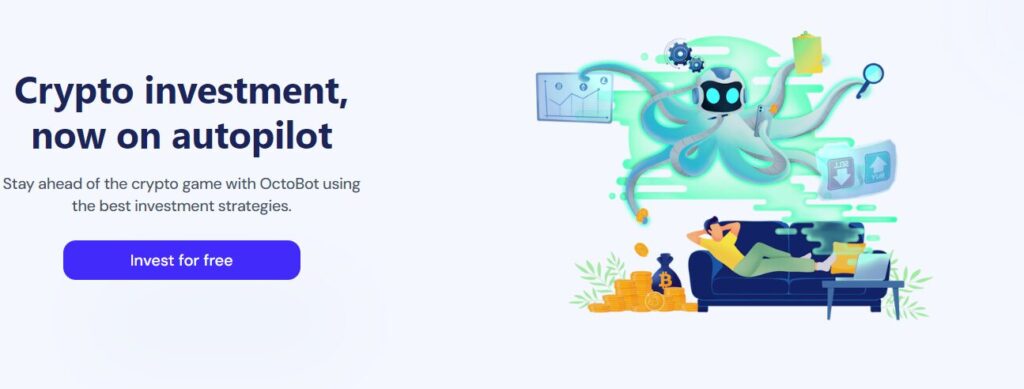
OctoBot is an open-source crypto trading bot founded in 2018. It started as a self-hosted GitHub project and has since grown into a full cloud platform — currently at version 2.1.1 as of March 2026. You connect your exchange via API keys, pick a strategy, and the bot runs it automatically. Your funds stay on your own exchange at all times.
What sets OctoBot apart from most bots is transparency. The code is public on GitHub, so you can verify exactly how each strategy works before trusting it with your API keys. There are no hidden profit-sharing mechanics, no black-box signals, and no mandatory subscriptions to access core features. That’s rare in this space.
The cloud version handles all the infrastructure for you — no server setup, no command line. If you want full control, self-hosting is still an option. But for most users, the cloud is the easiest starting point.
OctoBot Cloud Features
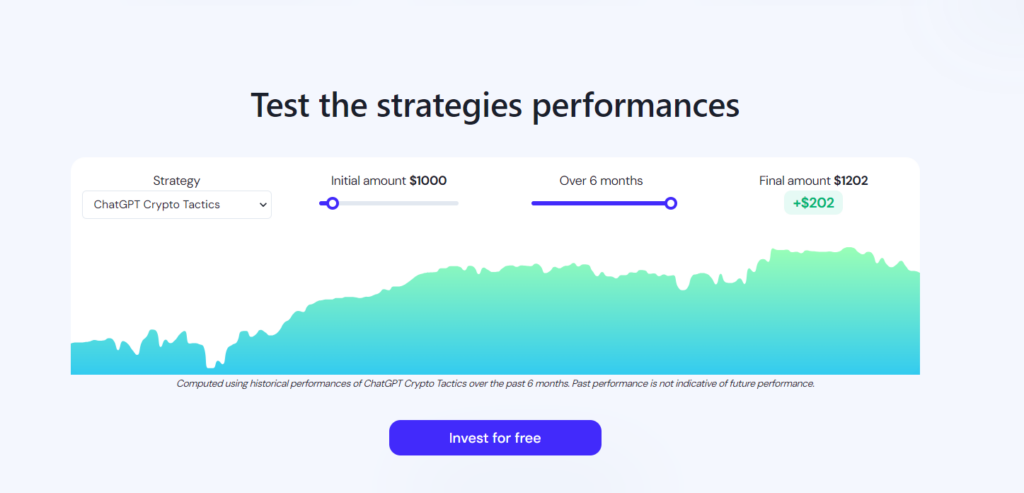
DCA (Dollar Cost Averaging)
OctoBot’s DCA mode automates recurring buys and sells with custom entry and exit rules. You can set as many orders as you want, optimize each one independently, and use it for long-term accumulation or short-term trading plays. It works on both spot and futures markets.
Grid Trading
The grid bot places a ladder of buy and sell orders around a price range, capturing profit from sideways market movement. OctoBot lets you fine-tune grid spacing, order size, and range for each trading pair — more control than most paid grid bots offer at comparable price points.
TradingView Automation (Pro Plan)
On the Pro plan, you can connect your TradingView strategies and indicators directly to OctoBot. When your indicator fires an alert, OctoBot places the order automatically on your exchange. This is the feature that makes OctoBot a serious option for traders who already have a Pine Script strategy and want to run it live without manual execution.
AI and ChatGPT Strategies
OctoBot supports AI-powered strategy modes including OpenAI/ChatGPT and Ollama (local LLM) connectors. The new AI agent mode (beta as of early 2026) lets you configure an AI model to make trading decisions based on live market conditions. It’s experimental, but it’s one of the more interesting developments in the bot space right now. You can also integrate custom ChatGPT forecasts into any strategy.
Backtesting Engine
Before going live, test any strategy against historical data using OctoBot’s built-in backtesting engine. You get detailed metrics and a visualization of where trades would have been placed. If a strategy shows poor historical performance, OctoBot flags it before you deploy it with real capital. This is included on the free plan.
Paper Trading (Simulation Mode)
OctoBot can run in simulation mode — same logic, same timing as live trading, but with zero real money at risk. It’s the best way to validate a new strategy before committing capital, and it runs in the background without any subscription required.
Crypto Basket Trading
OctoBot’s crypto basket strategy lets you automate diversified exposure across multiple assets at once. You define the basket composition and rebalancing rules, and the bot handles execution. This works particularly well for index-style investing where you want regular rebalancing without manual trades.
Mobile App (iOS + Android)
OctoBot has apps for both Android and iOS — the iOS version launched in 2025, making it available on both major platforms. The app lets you monitor bot activity, check portfolio performance, and trigger an emergency sell if needed. You can also control your bot through Telegram if you want quick access without opening the app.
New in 2025–2026
- Hyperliquid DEX support — OctoBot now supports the Hyperliquid decentralized perpetuals exchange, one of the fastest-growing DEXes in 2025
- Polymarket trading (beta) — Automate trades on Polymarket prediction markets — one of the few bots to offer this
- DSL trading mode — A new domain-specific language for building custom strategy logic without writing Python
- AI agent strategies (beta) — A mode where an AI model drives trading decisions autonomously based on live conditions
- iOS mobile app — Previously Android-only; now fully available on both platforms
- Version 2.1.1 — Latest stable release as of March 2026 with unified codebase and macOS arm64 binaries
Supported Exchanges
OctoBot connects to 15+ exchanges via API. Your funds always stay on your own exchange — OctoBot only gets trade execution access, never withdrawal permissions. Hyperliquid DEX support was added in 2025, making it one of a small number of bots that works on decentralized exchanges.
| Exchange | Type | Spot | Futures |
|---|---|---|---|
| Binance | CEX | ✅ | ✅ |
| OKX | CEX | ✅ | ✅ |
| Bybit | CEX | ✅ | ✅ |
| KuCoin | CEX | ✅ | ✅ |
| Coinbase | CEX | ✅ | ❌ |
| Bitget | CEX | ✅ | ✅ |
| Gate.io | CEX | ✅ | ✅ |
| MEXC | CEX | ✅ | ✅ |
| HTX (Huobi) | CEX | ✅ | ✅ |
| Crypto.com | CEX | ✅ | ❌ |
| Binance.US | CEX | ✅ | ❌ |
| BingX, CoinEx, Phemex, AscendEx, OKcoin | CEX | ✅ | Varies |
| Hyperliquid | DEX | ❌ | ✅ |
| 15+ exchanges supported — funds always stay on your own exchange account, never with OctoBot | |||
OctoBot Cloud Pricing
OctoBot uses a freemium model with three plans. The free tier is the standout — it’s not a limited trial, and OctoBot takes no percentage of your profits on any plan. Here’s the full breakdown:
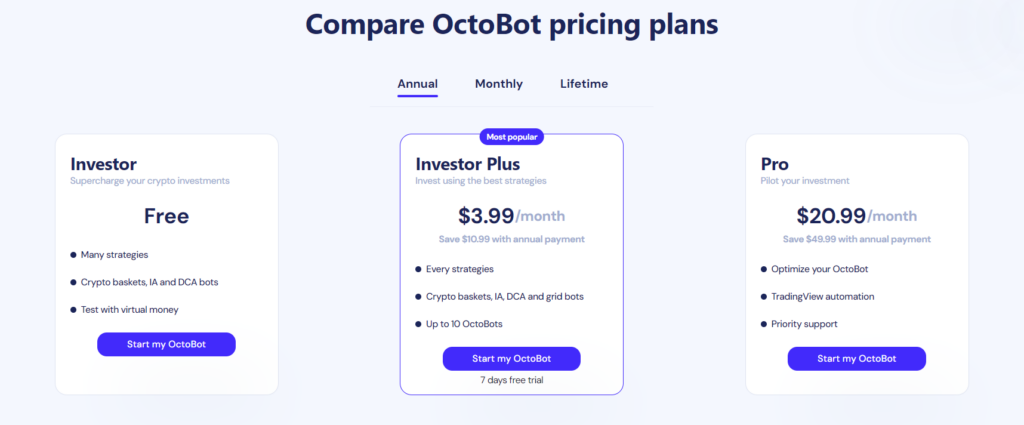
| Plan | Monthly Price | Bot Limit | What You Get |
|---|---|---|---|
| Investor (Free) | $0 | Limited | Core DCA + Grid strategies, paper trading, backtesting, no % cut on profits |
| Investor Plus | $9.99/mo | Up to 10 | All strategies (AI, crypto basket, DCA, Grid), expanded exchange access |
| Pro | $29.99/mo | Up to 30 | TradingView automation, futures trading, all Investor Plus features |
| Annual and lifetime plans available. Pay by credit card or crypto. No % taken on profits on any plan. | |||
The free plan’s biggest advantage is the no-profit-cut policy. Most competing bots take 10–20% of your gains on free or entry tiers. OctoBot doesn’t. If you want TradingView automation or futures support, the Pro plan at $29.99/month is priced well below 3Commas (which charges similar or more for equivalent features).
OctoBot Cloud Security
Here’s what OctoBot does to protect your account when you connect an exchange API:
- Encrypted API key storage — Exchange API keys are stored in an encrypted vault. Even if OctoBot’s servers were compromised, the keys would be unreadable.
- No withdrawal permissions — OctoBot explicitly blocks API keys with withdrawal rights. The bot can place and cancel orders, but it cannot move your funds off the exchange.
- No custody of funds — Your crypto never leaves your exchange account. OctoBot operates entirely through exchange API calls.
- Open-source code — The trading logic is public on GitHub. Anyone can audit the code for hidden functions or malicious behavior.
- Automated strategies only — Strategy execution is code-driven. No human at OctoBot can manually trade on your account.
OctoBot has no reported security incidents or exchange API breaches as of April 2026. The open-source model provides a layer of accountability that closed-source bots simply can’t match.
OctoBot Cloud Pros and Cons
| ✅ Pros | ⚠️ Cons |
|---|---|
| Genuine free plan — no profit sharing, no time limit | TradingView automation requires Pro plan ($29.99/mo) |
| Fully open-source — audit the code before trusting it | Advanced strategy configuration has a learning curve |
| 15+ exchanges + Hyperliquid DEX support | AI agent and Polymarket modes are still in beta |
| Paper trading + backtesting included free | No copy trading or strategy marketplace |
| No withdrawal permissions — funds stay on exchange | Self-hosted setup requires technical knowledge |
| iOS + Android mobile apps available | Strategy results depend heavily on your configuration |
| Pay subscriptions with cryptocurrency | Some niche exchanges not yet supported |
| Trustpilot: 4.2/5 (March 2026) · SourceForge: 4.4/5 — Most complaints relate to strategy configuration complexity, not platform reliability | |
OctoBot vs Competitors
How does OctoBot stack up against the most popular crypto trading bots?
| Bot | Free Plan | Starting Price | TradingView | Open Source | Best For |
|---|---|---|---|---|---|
| OctoBot Cloud | ✅ Yes | $9.99/mo | ✅ Pro plan | ✅ Yes | Transparent automation, free DCA/Grid |
| 3Commas | ⚠️ Limited | $29/mo | ✅ Yes | ❌ No | Advanced bots, copy trading |
| Pionex | ✅ Yes | Free | ❌ No | ❌ No | Built-in exchange, 16 free bots |
| Bitsgap | ❌ Trial only | $23/mo | ✅ Yes | ❌ No | Grid and DCA, clean interface |
| Cryptohopper | ⚠️ Limited | $19/mo | ✅ Yes | ❌ No | Strategy marketplace, copy trading |
| OctoBot has the strongest free plan and the only open-source codebase among the major crypto trading bots | |||||
Who Should Use OctoBot Cloud?
✅ Best For
- DCA or grid traders who want free automation with no profit cut
- TradingView users who have a Pine Script strategy and want to run it live automatically (Pro plan)
- Transparency-focused traders who want to audit the bot code before handing over API access
- Crypto enthusiasts who want to experiment with AI agent strategies or Hyperliquid DEX without a big subscription commitment
- Beginners who want to test strategies risk-free via paper trading before going live
⚠️ Skip OctoBot If
- You want copy trading with a leaderboard of top performers — OctoBot doesn’t offer this
- You need a fully managed, set-and-forget signal service with zero configuration
- You’re not comfortable connecting API keys and managing strategy parameters
💡 Bottom Line: OctoBot Cloud earns its spot as one of the best free crypto trading bots available. The free plan is the real deal — no profit sharing, no hidden fees. The open-source code means you can verify exactly what the bot does before trusting it. The Pro plan ($29.99/mo) is worth it if you want TradingView automation or futures support. New additions like Hyperliquid DEX, AI agent mode, and iOS app show this project is actively moving forward. If you’re weighing OctoBot against a pricier closed-source alternative, start here first.
Reviewed by: CoinCodeCap Editorial Team · Last Updated: April 2026
Our editorial team tests and verifies every product we review. Affiliate commissions may be earned via links in this article — this never affects our ratings or recommendations.
Frequently Asked Questions
Is OctoBot Cloud free?
Yes. OctoBot Cloud’s Investor plan is completely free with no monthly fee and no percentage taken from your profits. It includes core DCA and Grid strategies, paper trading, and backtesting. Paid plans start at $9.99/month for Investor Plus (all strategies, up to 10 bots) and $29.99/month for Pro (TradingView automation, futures trading, up to 30 bots).
Is OctoBot Cloud safe?
OctoBot stores exchange API keys in an encrypted vault and does not accept API keys with withdrawal permissions. Your crypto never leaves your exchange account — OctoBot only places and cancels orders. The platform is open-source, so the code is publicly auditable. OctoBot has no known security incidents as of April 2026.
What exchanges does OctoBot support?
OctoBot supports 15+ exchanges including Binance, Bybit, OKX, KuCoin, Coinbase, Bitget, Gate.io, MEXC, HTX, Crypto.com, BingX, CoinEx, and Phemex. It also added Hyperliquid DEX support in 2025 — one of the few bots compatible with decentralized exchanges.
Does OctoBot work with TradingView?
Yes, on the Pro plan ($29.99/month). The TradingView connector automates any indicator or strategy alert directly on your exchange. When your Pine Script strategy fires, OctoBot places the order in real time. This feature is not available on the free or Investor Plus plans.
Can OctoBot guarantee profits?
No. OctoBot doesn’t guarantee returns, and no legitimate trading bot does. Profitability depends on your strategy configuration, market conditions, and capital management. The backtesting and paper trading tools help you evaluate strategies before risking real money — but past performance doesn’t predict future results. Always test first.
Related Articles
📋 Individual Reviews: 3Commas Review | Pionex Review | Bitsgap Review
📊 Related Comparisons: Best Crypto Trading Bots | 3Commas vs Coinrule
⬆️ Full Guide: Best Crypto Trading Bots — Complete Guide