Affiliate Disclosure: This post contains affiliate links. If you sign up through them, CoinCodeCap may earn a commission at no extra cost to you. Read the full disclosure.
Inky is Kraken’s mobile-first app for simple on-chain trading. It turns token discovery into a swipe-and-buy experience, reduces wallet setup friction, and helps beginners get exposure to real markets without juggling bridges, networks, and confusing trading panels. In this article, we will explore Inky Review.
What is Inky?
If most on-chain apps feel like “open wallet, pick chain, bridge funds, approve, swap, confirm gas,” Inky tries to feel like “browse tokens, tap buy, track your holdings.”
Inky is built around three beginner priorities:
- Easy entry: Sign in, get a self-custody wallet created for you.
- Fast decisions: Swipe through tokens like a feed, with quick context and charts.
- Quick execution: Buy and sell with fewer steps, using a stablecoin “Cash” balance.
It’s not trying to be a pro terminal. It’s trying to be a clean on-chain starter app. Interactive check: Which one sounds like you?

- “I want to explore tokens without getting lost.”
- “I already know what I want to trade, I just want the best execution.”
If you picked A, Inky fits your style. If you picked B, you may outgrow it quickly.
Inky at a glance (Beginner cheat sheet)
| Category | What it means in Inky | Why beginners care |
| Best for | Discovery-led on-chain trading | Helps you explore without knowing token names |
| Wallet style | Self-custody, simplified setup | Fewer setup steps, but still real wallet responsibility |
| Core mechanic | Swipeable token discovery + one-tap trading | Faster decisions, less menu hunting |
| “Cash” balance | Stablecoin buffer used for quick buys and sells | Keeps trades simple and pricing predictable |
| Fees | Platform fee on swaps plus on-chain realities | Learn to watch execution, impact, and network costs |
| Control level | Low to medium | Great for starting, limited for advanced execution |
| Withdrawal path | Must be verified in-app and docs | Prevents “I can’t move funds where I want” surprises |
The core experience: discovery-led trading
Most apps ask: “What pair do you want?”
Inky asks: “What’s moving right now?”
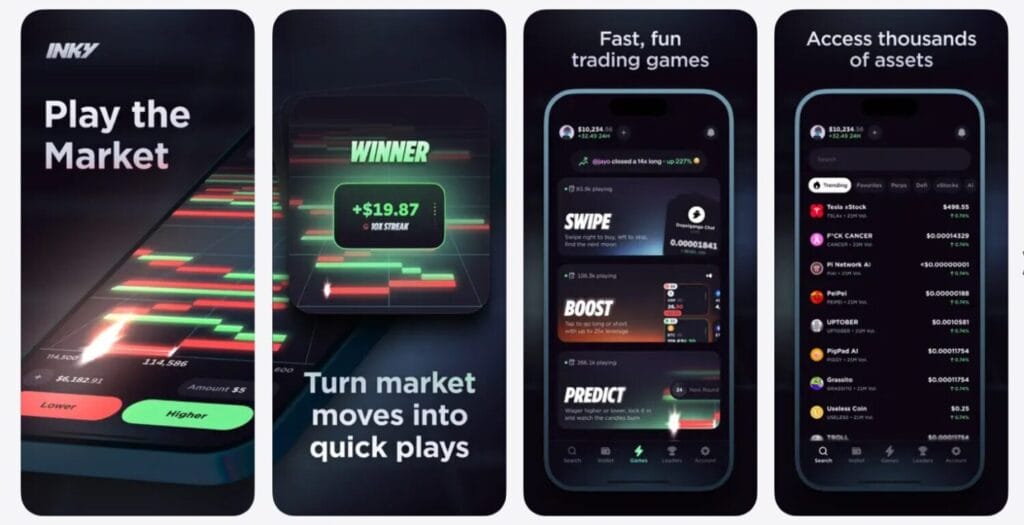
The home experience leans into discovery:
- Trending tokens (attention and momentum)
- New tokens (fresh listings and emerging narratives)
- Categories (themes that help you browse without knowing names)
- Swipe cards (fast yes/no decisions)
The swipe model is the signature move. It compresses the “search, open chart, decide, trade” loop into something you can do in seconds.
Beginner-friendly tip: Use the swipe feed for discovery, but pause before buying. Open the token card, look at the chart, and check whether it is already spiking. A clean UI can make impulse buys feel harmless. They are not.
Wallet model: self-custody, but simplified
Inky creates a self-custody wallet at signup and keeps the experience smooth by hiding the usual technical steps until you need them.
What that means for you:
- You are not “trading inside an exchange account” only.
- Transactions are real on-chain actions.
- If you choose to export keys, you take full responsibility for wallet security.
Are you comfortable with self-custody?
- If losing access to your phone would make you panic, take five minutes to understand your backup and recovery options inside the app before you trade meaningfully.
If you already manage wallets, you’ll appreciate the reduced friction.
Inky Review: Funding and “Cash” balance
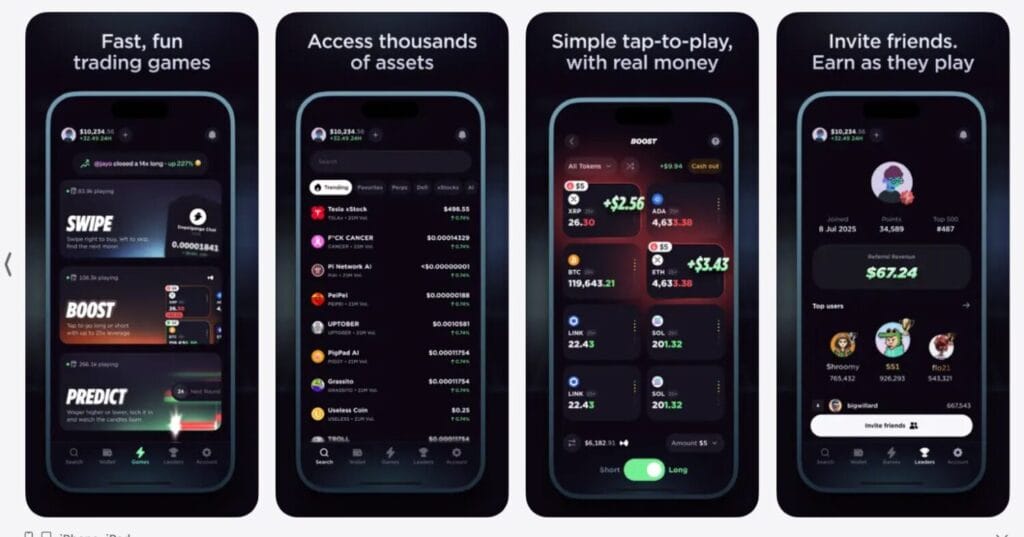
Inky uses a “Cash” balance concept for smoother trading. Think of it as your stablecoin buffer that you can deploy quickly into token buys and receive back when you sell.
Why this is smart:
- Stablecoins reduce “I deposited the wrong asset” mistakes.
- Stablecoins simplify pricing and portfolio tracking.
- The buy flow is faster when the app can trade from a ready balance.
Funding can be done through: - Transfer from Kraken (when available)
- Crypto deposits
- Traditional payment rails (region-dependent)
Beginner tip: Keep your Cash balance small until you understand the app’s full flow, including withdrawals. Treat it like a trading wallet, not a savings account.
Inky Review: Trading flow
Inky’s trading is designed to feel lightweight:
- Browse token → open details → buy
- Portfolio → pick token → sell back to Cash
This is great for beginners because you are not forced to understand order books, maker-taker tiers, routing settings, or multi-step confirmations.
But there’s a catch: fewer knobs means fewer controls. If you care about advanced settings, tight slippage configuration, or specific routing preferences, Inky may feel too abstract.
What do you value more right now?
- Speed and simplicity
- Precision and control
If you choose speed, Inky is aligned. If you choose precision, you will want more advanced tools.
Inky Review: Fees
Inky keeps the fee story simple: trading is not free, and you should expect a clear platform fee for swapping one digital asset into another.
On top of any platform fee, remember the on-chain realities:
- Network fees may apply
- Price impact is real when liquidity is thin
- Fast, simple flows can hide execution nuance
Beginner tip: For your first few trades, use small amounts and compare the price you expected vs the price you got. That habit teaches execution awareness without turning you into a spreadsheet trader.
Inky Review: Withdrawals
This is the part many users ignore until it matters.Before you deposit meaningful funds, confirm:
- Where can you withdraw to
- Which network withdrawals are supported
- Whether Cash withdrawals convert between stablecoins
Why it matters: A clean app can make it feel like funds are universally portable. In crypto, “portable” depends on network support.
Beginner rule: If you cannot clearly explain your exit path, do not size up.
Inky Review: Security and privacy
Inky benefits from Kraken’s product maturity and modern wallet infrastructure patterns. But security is still a shared responsibility.
Safe habits that matter more than brand names:
- Lock your phone and secure your account credentials
- Avoid exporting keys unless you truly need it
- Assume on-chain transactions are irreversible
- Treat public blockchain activity as analyzable
Are you trading or collecting?
- If you are collecting long-term positions, your security bar should be higher.
- If you are trading small sizes, you still need protection, but the risk profile changes.
What Inky gets right
- Beginner-first onboarding: You get moving quickly without learning ten new tools.
- Discovery that feels natural: Browsing is actually enjoyable.
- Fast execution loop: Buy and sell flows are designed for phones, not desktops.
- Stablecoin “Cash” framing: Reduces common beginner mistakes.
Where Inky will frustrate experienced users
- Limited advanced controls: Pro traders will want more knobs.
- Execution transparency: Some users want deeper clarity on routing and impact.
- Withdrawal constraints: You must confirm network support for your exit path.
- Gamified feel: Anything swipe-first can encourage impulsive trades.
Inky Review: Conclusion
Inky is one of the better “on-chain trading for normal humans” attempts because it focuses on the real bottleneck: friction. It makes discovery natural, removes setup pain, and keeps buying and selling simple. The trade-off is that power users will want more control, and beginners must still respect the basics like withdrawals, execution, and security.
If your goal is to explore markets and learn on-chain trading without drowning in tools, Inky is a strong starting point. Just do it with small test sizes until you fully understand the flow.
Do I need a Kraken account to use Inky?
Inky is designed as a Kraken product, so a Kraken account is typically part of the onboarding flow, especially if you want smooth funding and compliance-aligned access
Is Inky custodial or non-custodial?
The product framing is “Kraken-backed onchain access,” but the exact custody model depends on how wallets, keys, and accounts are implemented in your region and setup.
Are fees on Inky the same as Kraken trading fees?
Not necessarily. Onchain swaps often include swap fees, spreads, and network costs. Kraken exchange fees and onchain execution costs are different categories.