⚠️ Affiliate Disclosure: CoinCodeCap may earn a commission if you sign up through links on this page. This doesn’t affect our editorial independence — we only recommend products we’ve researched and verified. Read our full disclosure.
Editorial Note: This guide was researched and written by the CoinCodeCap editorial team. We test bots, verify pricing directly with platforms, and update articles when fees or features change. Pricing and features verified April 2026.
Dollar-cost averaging is one of the most proven investment strategies in crypto — and Quadency‘s Accumulator bot automates the whole process across 20+ exchanges. You set the amount, the frequency, and the trading pair. The bot handles the rest.
This guide covers how the Quadency DCA bot works, the current pricing, supported exchanges, and how it compares to Pionex and 3Commas. We’ve updated everything for 2026, including the platform’s rebrand to Quad Terminal.
⚡ TL;DR — Quadency DCA Bot (Accumulator)
- Platform: Quadency (now Quad Terminal), founded 2018, New York — fully active in 2026
- DCA Bot: Called “Accumulator” — splits a total budget into timed buy orders
- Free plan: HODL tier — 1 live bot, up to $10K/month trading volume, no credit card
- Paid plan: Pro — $39/mo (annual) or $49/mo (monthly) — 10 bots, up to $100K/month
- Exchanges: 20+ including Binance, KuCoin, OKX, Kraken, Coinbase, Gemini
- New in 2025: Cody AI assistant — describe a strategy in plain English, bot sets it up
- Best for: Passive investors automating DCA across major CEXs without paying monthly fees
What Is Quadency (Quad Terminal)?
Quadency is a multi-exchange crypto trading and automation platform founded in 2018 in New York. In 2025 the company rebranded under the name Quad Terminal — same product, new positioning. Most external reviews and affiliate links still reference “Quadency,” so you’ll see both names used interchangeably. The underlying platform, bots, and pricing structure are unchanged.

The core value prop: connect your existing exchange accounts via API, then manage everything — portfolio tracking, trading, and automated bots — from one dashboard. No need to log into Binance, Kraken, and Coinbase separately. Quadency pulls them all together.
The platform offers 12 trading bots. This guide focuses specifically on the Accumulator (DCA) bot. For the full platform breakdown, see our Quadency Review.
| Criteria | Score | Notes |
|---|---|---|
| Ease of Use | ⭐⭐⭐⭐ | Clean setup UI; Cody AI reduces configuration friction for beginners |
| DCA Bot Features | ⭐⭐⭐⭐ | Stop triggers, price ceiling, backtesting — solid depth for a free tool |
| Exchange Support | ⭐⭐⭐⭐ | 20+ major CEXs; covers Binance, Coinbase, Kraken, KuCoin, OKX |
| Pricing Value | ⭐⭐⭐⭐ | Free plan is genuinely usable; Pro at $39/mo is fair for active traders |
| Safety & Trust | ⭐⭐⭐⭐ | API-key only (no withdrawal access); no security incidents since 2018 |
| Overall: 4/5 — Strong free-tier DCA bot with solid multi-exchange support | ||
What Is Dollar-Cost Averaging (DCA)?
DCA stands for Dollar-Cost Averaging — an investment strategy where you split a lump sum into smaller, periodic purchases instead of buying all at once. For example, instead of buying $1,000 worth of Bitcoin today, you buy $100 every week for 10 weeks.
The logic is simple: sometimes you’ll buy high, sometimes low, but your average cost smooths out over time. It removes the pressure of trying to time the market perfectly. That said, DCA reduces timing risk — it doesn’t eliminate losses in a sustained bear market.
Executing DCA manually means setting calendar reminders, logging in, placing orders, and repeating. A DCA bot handles all of that automatically. For a deeper dive on the strategy, read our Dollar-Cost Averaging Guide.
Quadency Accumulator Bot — How It Works
Quadency’s DCA tool is called the Accumulator bot. The name fits: it systematically accumulates a position in any asset by placing scheduled buy orders over time. You configure it once and it runs on autopilot.
A few things that stand out about the Accumulator compared to basic DCA tools:
- Stop triggers: You can tell the bot to stop when the time window expires OR when the total spend budget is exhausted — whichever you prefer as the primary constraint.
- Price ceiling: Set a “Don’t buy above price” threshold. If the asset spikes above that level, the bot pauses — protecting you from accidentally buying into a pump.
- Backtesting: Run your configuration against historical data before committing real money.
- Order rate: Maximum 1 order per minute; run duration can range from minutes to years.
How to Use the Quadency Accumulator Bot (Step-by-Step)
Step 1: Create a Quadency Account
Sign up at quadency.com. New users get a 30-day free trial of the Pro plan — no credit card needed. Once you’re in, enable 2FA immediately (Settings → Security). Quadency sends an approval email each time you log in from a new device unless 2FA is active.
Step 2: Connect Your Exchange via API
Go to Connections and link your exchange account using an API key and secret. Create the API key on your exchange’s settings page — enable trading permissions only, never withdrawal permissions. Quadency only requests read and trade access; it never has the ability to withdraw your funds. Once connected, balances and trade history sync automatically.
Step 3: Open the Accumulator Bot
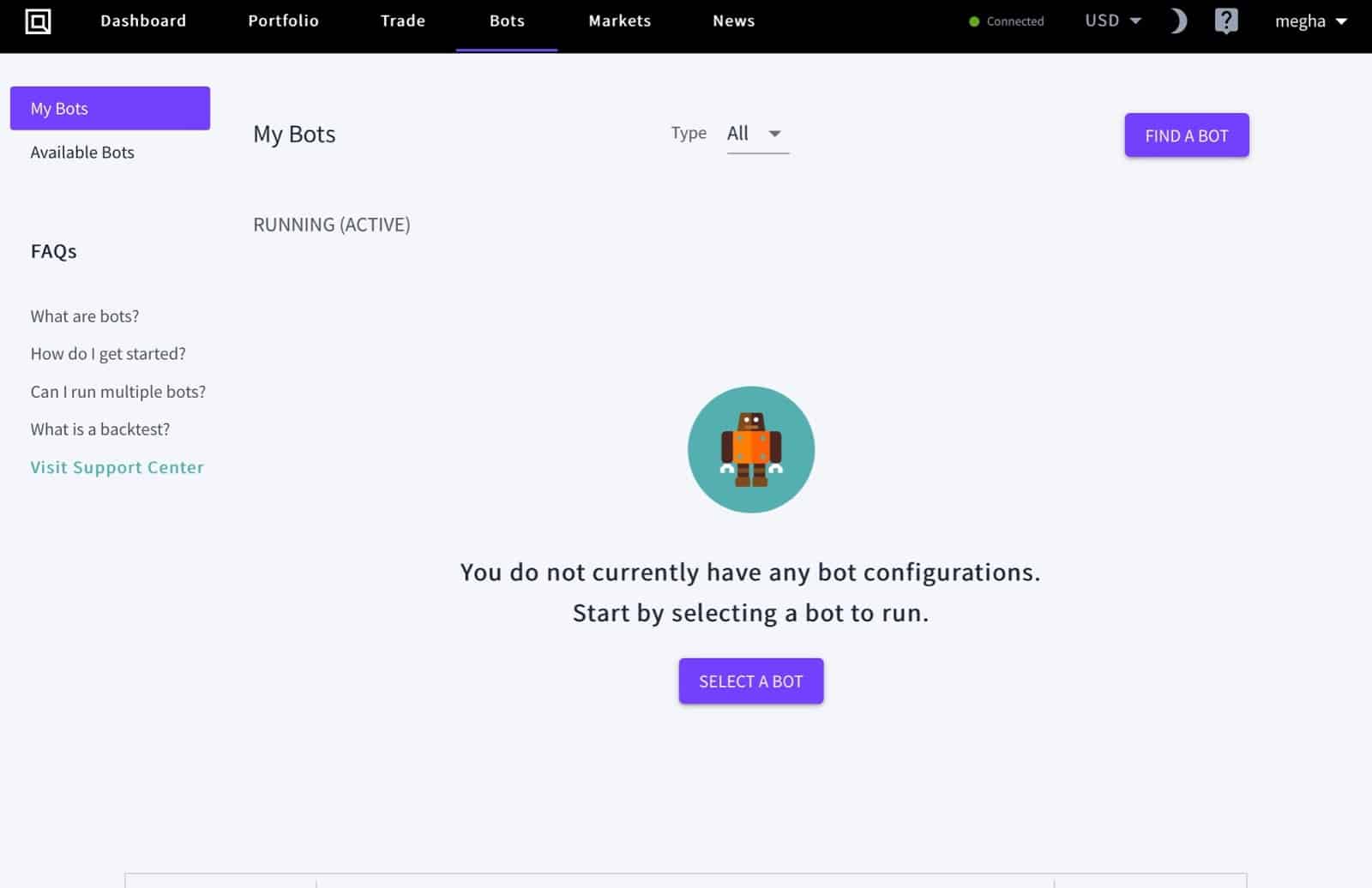
Click the Bots tab in the navigation bar. Hit SELECT A BOT — this lists all 12 available strategies. Choose Accumulator.
Step 4: Configure the Bot Parameters
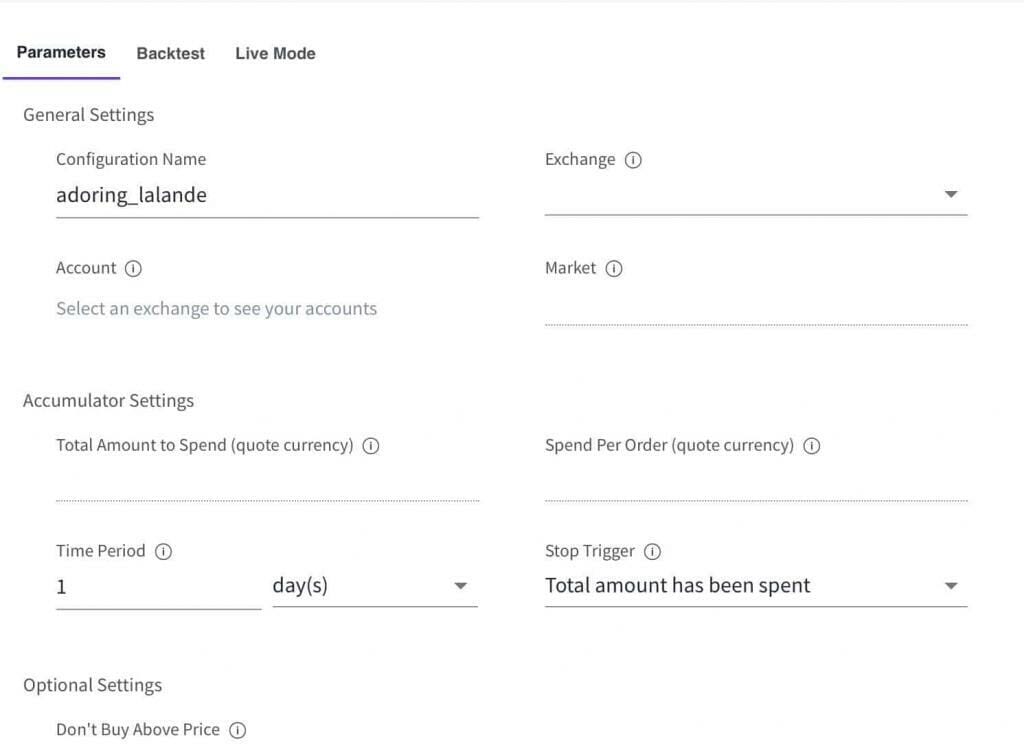
The Accumulator has 8–9 configuration fields. Here’s what each one does:
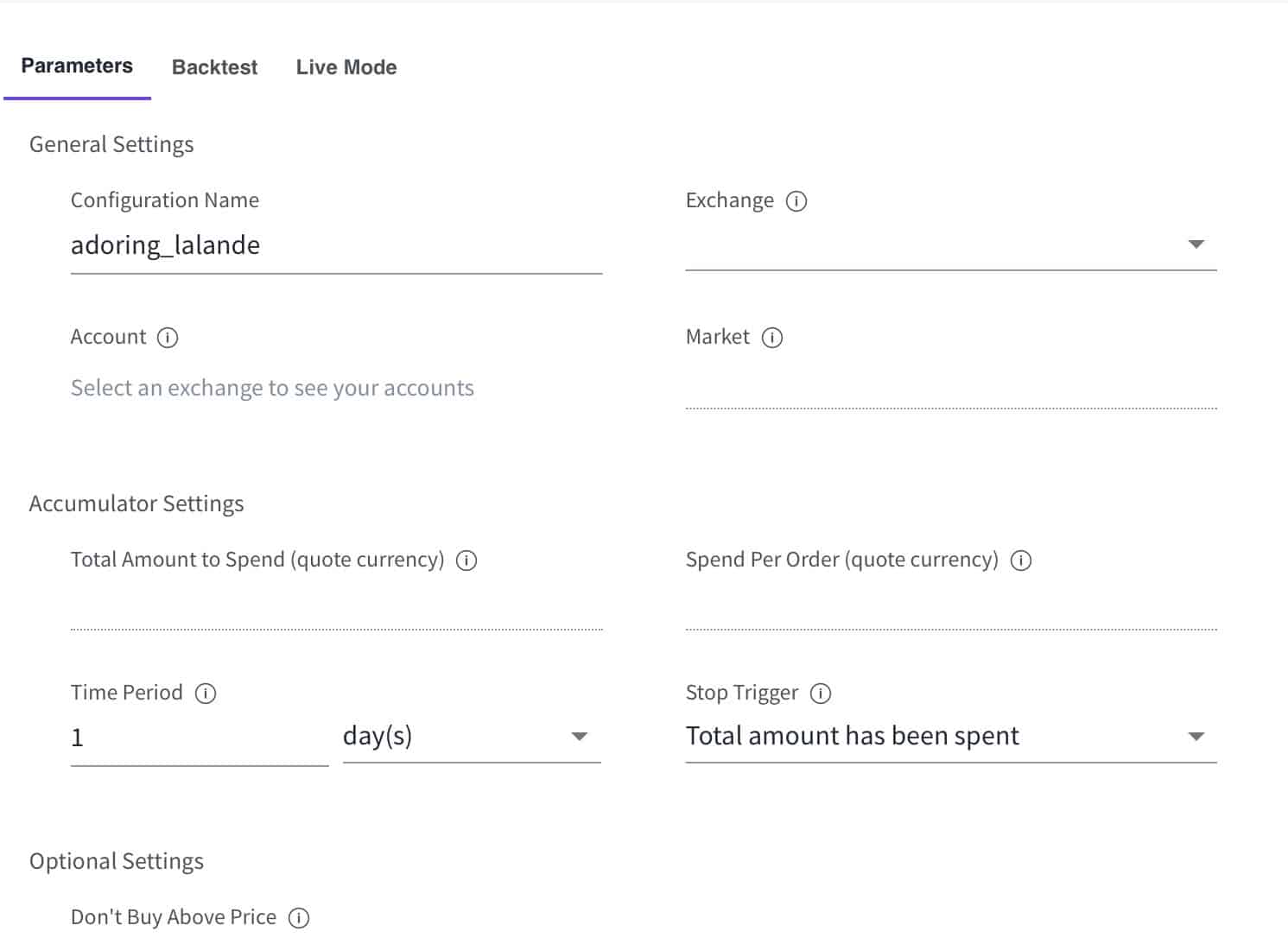
- Configuration name — Label this setup so you can reuse it later.
- Exchange — Pick the connected exchange where orders will be placed.
- Account — Select the API-connected account for that exchange.
- Market — The trading pair, e.g. BTC/USDT (buy BTC using USDT).
- Total amount to spend — Your full budget for this DCA run (in quote currency).
- Spend per order — How much to deploy in each individual buy order.
- Time period — How long the bot will run (a few minutes to years).
- Stop trigger — “Over Time Period” stops when time runs out; “Total Amount to Spend” stops when the budget is exhausted. Pick the constraint that matters more for your strategy.
- Don’t buy above price — Optional ceiling in quote currency. The bot pauses if the market rises above this price.
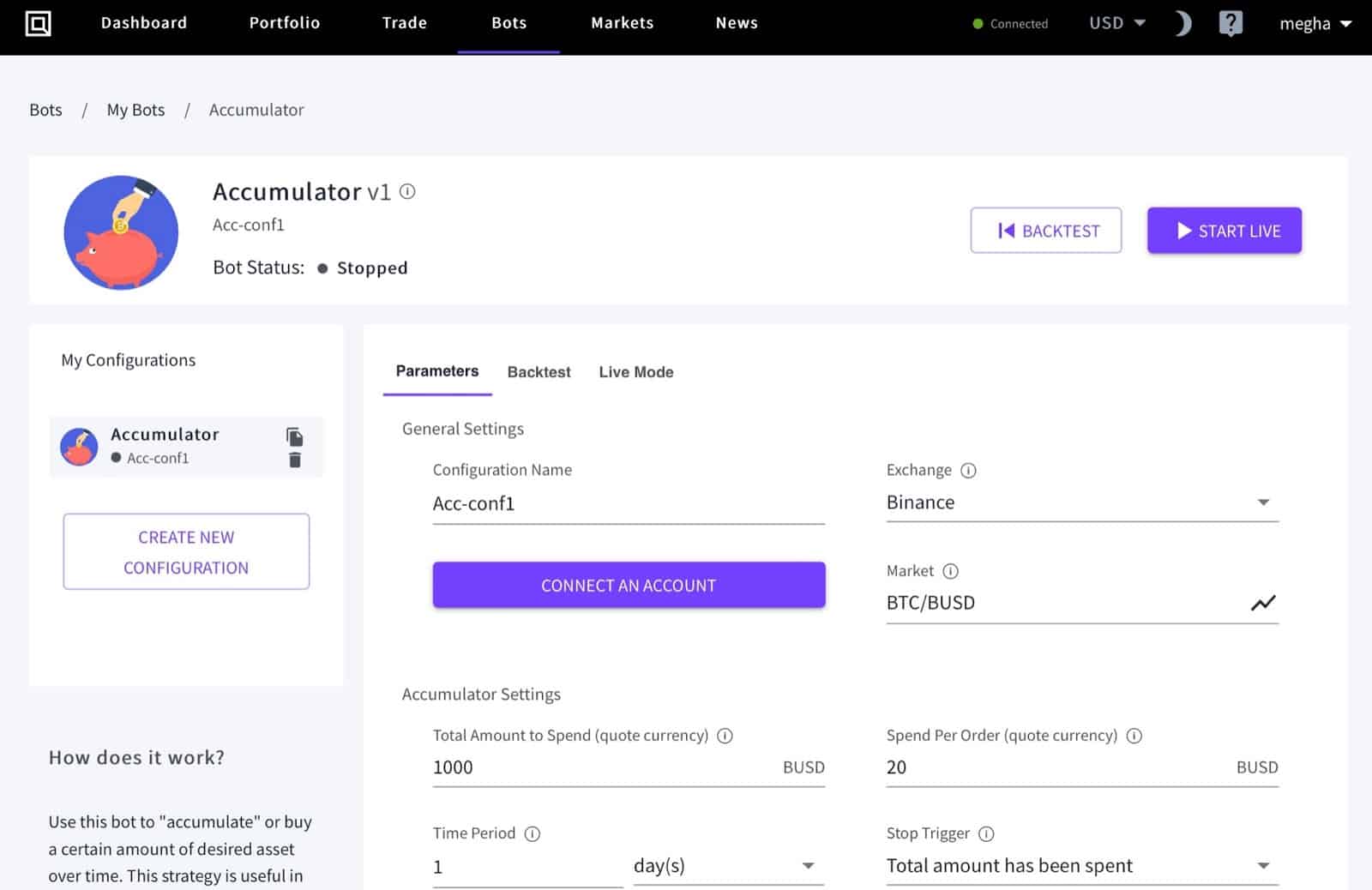
Example: DCA $1,000 into BTC over 24 hours at $20 per order. The bot calculates ~2 orders per hour. Set a price ceiling of $70,000 — if BTC spikes above that, orders pause until the price drops back.
Step 5: Backtest Then Go Live
Before committing real funds, hit BACKTEST. This simulates your configuration against historical price data so you can pressure-test the parameters. It’s not predictive — past performance doesn’t guarantee future results — but it helps you catch obviously bad setups before they go live. When ready, click START LIVE. The bot runs automatically from there.
Quadency Pricing (Updated April 2026)
Quadency offers three tiers. The free HODL plan is genuinely usable for casual DCA — the only real limit is one live bot at a time.
| Plan | Monthly Price | Annual Price | Live Bots | Monthly Trade Limit | Free Trial |
|---|---|---|---|---|---|
| HODL (Free) | $0 | $0 | 1 | $10,000 | — |
| Pro | $49/mo | $39/mo | 10 | $100,000 | 30 days free |
| Institutional | Custom | Custom | Unlimited | Unlimited | Contact team |
| QUAD token holders get up to 50% off paid subscriptions — verify current rates at quadterminal.com/pricing | |||||
One thing worth knowing: if you hold QUAD tokens (Quadency’s native token), you can unlock up to 50% off paid plans. Annual billing on Pro brings it down to $39/mo — reasonable if you’re running multiple DCA bots across different pairs or exchanges.
Supported Exchanges
The Accumulator bot works across all 20+ exchanges connected to Quadency. The major ones:
| Exchange | Region | Accumulator Bot |
|---|---|---|
| Binance | Global | ✅ Supported |
| Binance US | USA | ✅ Supported |
| Coinbase | USA / Global | ✅ Supported |
| KuCoin | Global | ✅ Supported |
| OKX | Global | ✅ Supported |
| Kraken | USA / Global | ✅ Supported |
| Gemini | USA | ✅ Supported |
| Bitfinex | Global | ✅ Supported |
| HitBTC | Global | ✅ Supported |
| Liquid | Asia-Pacific | ✅ Supported |
| 20+ exchanges total — check quadterminal.com for the full current list before connecting | ||
Is Quadency Safe?
Quadency has been running since 2018 with no reported hacks or security breaches. The key safety feature is the API-key model: the platform only requests read and trade permissions — never withdrawal access. That means if your Quadency account were somehow compromised, an attacker still couldn’t move your funds off your exchange.
Practical steps to protect yourself: enable 2FA on Quadency, create a dedicated API key on your exchange with trading-only permissions (disable withdrawals at the exchange level), and use a unique strong password. Those three things cover the vast majority of real-world risk.
⚠️ Risk Disclaimer: Automated trading bots don’t guarantee profits. DCA reduces timing risk but doesn’t prevent losses in a sustained bear market. Only automate amounts you’re comfortable holding through extended downturns. Past backtest results are not indicative of future performance.
Quadency DCA Bot — Pros and Cons
| ✅ Pros | ⚠️ Cons |
|---|---|
| Generous free plan — run 1 DCA bot at no cost | Free plan limited to $10K/month trading volume |
| Stop triggers + price ceiling = real risk controls | No DEX or on-chain DCA support |
| Cody AI assistant simplifies bot configuration | Multiple simultaneous bots require Pro plan ($39/mo+) |
| Backtesting before going live | Institutional pricing requires contacting the sales team |
| 20+ exchanges including all major CEXs | No mobile app bot management (web-based only) |
| Bottom line: Best free multi-exchange DCA bot for CEX passive investors | |
Quadency DCA Bot vs Competitors
| Platform | DCA Bot Name | Free Plan | Paid From | Exchanges | Standout Feature |
|---|---|---|---|---|---|
| Quadency | Accumulator | ✅ Yes (1 bot) | $39/mo | 20+ | Stop triggers + price ceiling + Cody AI |
| Pionex | DCA Bot | ✅ Yes (free) | $0 (exchange fees only) | Pionex only | Completely free; exchange + bot in one |
| 3Commas | SMART Trade DCA | ✅ Limited | $14.99/mo | 12+ | Most advanced conditional DCA triggers |
| Cryptohopper | DCA Strategy | ✅ Yes | $19/mo | 10+ | Strategy marketplace + copy trading |
| Pricing verified April 2026 — confirm at each platform before subscribing | |||||
Here’s the honest comparison: if you only use one exchange and want DCA at zero cost, Pionex is the answer — completely free, no subscription. Quadency’s edge is multi-exchange support: you can run simultaneous DCA bots on Binance, Kraken, and Coinbase from the same dashboard, all on the free tier (one bot at a time). If you need multiple bots running in parallel, the Pro plan at $39/mo is competitive. For more advanced DCA triggers — RSI-based entries, conditional logic — 3Commas has more flexibility, but you’ll pay more.
Who Should Use the Quadency Accumulator Bot?
Best For
- Passive investors who want automated DCA across Binance, Kraken, Coinbase, or KuCoin
- Anyone who wants a free DCA bot without switching to a new exchange
- Traders already on Quadency who want to add DCA runs alongside other strategies
- Beginners who want a structured setup process with backtesting before going live
Skip If
- You only use one exchange and want zero cost → Pionex is free and doesn’t require a separate subscription
- You need RSI-based or conditional DCA triggers → 3Commas offers more advanced options
- You want to DCA on-chain or via DEX → Quadency doesn’t support this yet
🏁 Bottom Line
The Quadency Accumulator is one of the cleanest, most accessible DCA bots available — and the free tier makes it usable without any subscription. The stop trigger system and price ceiling give you real control over how the bot behaves, which is more than most free tools offer. It’s not the most feature-rich DCA bot out there (3Commas has more conditional logic), but for straightforward multi-exchange passive investing, the value is hard to beat. The rebrand to Quad Terminal hasn’t changed how the bot works — same product, same pricing, just a new name.
Written by the CoinCodeCap Editorial Team
The CoinCodeCap editorial team researches and reviews crypto trading tools, exchanges, and automation platforms. We verify pricing and features directly with platforms before publishing, and update articles when products change. All affiliate relationships are disclosed above.
Frequently Asked Questions
Is the Quadency DCA bot free to use?
Yes. Quadency’s HODL plan is free and lets you run one live bot at a time, including the Accumulator (DCA) bot. The free tier has a $10,000/month trading volume cap. If you need multiple simultaneous DCA bots, you’ll need the Pro plan ($39/mo billed annually or $49/mo month-to-month). New accounts also get a 30-day free trial of Pro with no credit card required.
What exchanges does the Quadency Accumulator support?
The Accumulator bot works across all 20+ exchanges connected to Quadency, including Binance, Binance US, Coinbase, KuCoin, OKX, Kraken, Gemini, Bitfinex, HitBTC, and Liquid. You connect via API key — Quadency only requests read and trade permissions, never withdrawal access. Check quadterminal.com for the current full exchange list, as new integrations are added periodically.
What’s the difference between Quadency and Quad Terminal?
They’re the same platform. Quadency rebranded to Quad Terminal in 2025, but the product, bots, pricing, and exchange connections are unchanged. Most external reviews, affiliate links, and search results still use “Quadency” — both names refer to the same service at the same platform.
How is Quadency’s Accumulator different from a standard DCA bot?
The Accumulator adds two features most basic DCA bots skip: a stop trigger (control whether the bot stops based on elapsed time or total spend) and a price ceiling (the bot pauses if the asset price rises above a set threshold). Together, these give you meaningful control over execution without requiring complex conditional logic.
Is Quadency safe for automated crypto trading?
Quadency has operated since 2018 with no reported security breaches. The API-key model means the platform never holds your funds or has withdrawal access — your assets stay on your exchange. To maximize safety: enable 2FA on Quadency, create a dedicated API key with trading-only permissions (no withdrawals), and use a unique strong password. These steps cover the vast majority of real-world risk.
📚 Related Reading
📋 Individual Reviews: Quadency Review | Pionex DCA Bot | WunderTrading Review
📊 Related Comparisons: Quadency vs Bitsgap vs HAL (Napbots) | Quadency vs 3Commas vs Pionex
⬆️ Full Guide: Best Crypto Trading Bots